Caregiver Calendar: How Coordinated Schedules Reduce Stress
A shared calendar keeps a care team in sync, but only with a few ground rules. Here is a copy-ready template, the five rules that make it stick, the right tool for your family, and a weekend plan to set it up.

Last verified · 9 min read
This guide is general information for caregivers, not medical, legal, or financial advice. Details were reviewed and updated in July 2026.
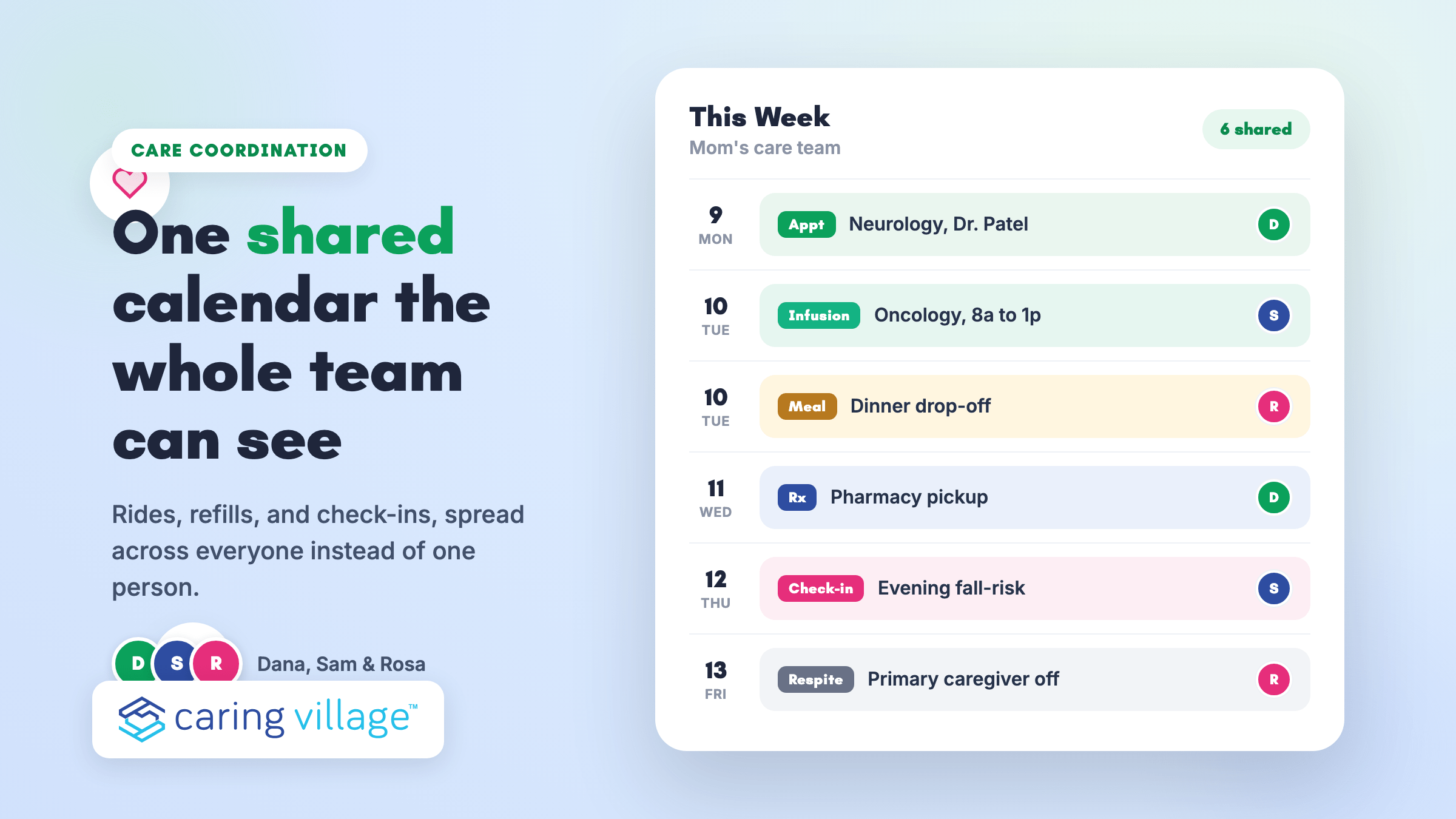
When one parent needs rides to the neurologist, a Tuesday infusion, a pharmacy pickup, and someone to check in after dark, the schedule usually lives in three group texts, a sticky note on the fridge, and one person’s memory. That person burns out first. A calendar is one part of caring for elderly parents; medication, safety, legal, and benefits work still need their own owners.
A shared caregiver calendar fixes that, but only if it is built with a few ground rules instead of just switched on.
This guide gives you a copy-ready calendar template, the five rules that keep a care team actually using it, a quick decision on which tool fits your family, and a weekend setup plan.
If you are new to organizing a parent’s care, it pairs well with the broader work of learning to coordinate care for an aging parent.
What A Caregiver Calendar Actually Does
A caregiver calendar is not just a list of appointments. It is the one place your whole care team looks to know who is doing what, when, and what happens if plans change.
Health researchers have a name for this. AHRQ defines care coordination as “deliberately organizing patient care activities and sharing information among all of the participants concerned with a patient’s care to achieve safer and more effective care.”
A shared calendar is where that deliberate organizing actually lives day to day.
Done right, a coordinated calendar gives the whole team:
- Shared visibility. Everyone sees the same schedule, so no one is guessing or waiting for an update text.
- Even distribution. Rides, refills, and check-ins spread across the team instead of landing on one person. List the full set of caregiver responsibilities first, then put only time-bound work on the calendar.
- Easy asks. When Thursday needs a driver, you request help in one place instead of texting five people.
- Group-wide changes. A moved appointment updates once, for everyone, instead of starting a new thread.
- Fewer misses. Standardized events and reminders cut down on double-booking and missed doses.
- Saved energy. Less mental juggling for the primary caregiver, which is the whole point. If the schedule is already affecting sleep, patience, or health, use these caregiver burnout solutions while the team redistributes coverage.
Here is what people get wrong: they treat it like a personal planner, which only has to make sense to one person.
A care team calendar has to make sense to a sibling three states away, a neighbor who covers Fridays, and a home health aide who started last week. That is why naming and ownership matter more than the tool. The same owner, backup, and handoff rules are central to long-distance caregiving, where a local helper may need to act before family can arrive.
Build Your Care Team Calendar: Template And Ground Rules
This is the part most guides skip. Below are the five rules that make a shared calendar stick, plus a template you can copy into any calendar, spreadsheet, or printout.
The Five Ground Rules
- One source of truth. Pick one calendar and make it the only one that counts. Personal calendars can sync to it, but the shared calendar wins every time.
- Standardized event names. Start every event with a tag so anyone can scan the week: [Appt], [Rx], [Ride], [Meal], [Check-in]. “Neuro, Dr. Patel” beats “appointment.”
- An owner and a backup on every event. The owner runs it. The backup steps in if the owner cancels. No event goes live without both.
- A 24-hour change protocol. Any change inside 24 hours gets a message to the owner and backup, not just a silent edit. Silent edits are how people show up to an appointment that moved.
- Visible handoff notes. One line per event: what the next person needs to know. “Bring insurance card and the new med list” saves a phone call.
Give Every Event an Owner the Whole Family Can See
Give every event an owner and backup on one shared calendar. Caring Village shows nearby aides and long-distance family the same current week.
- Assign an owner and a backup to any event
- One shared week the whole care team opens
- Reminders and handoff notes on every event
The Care Team Calendar Template
Seven columns that work on paper, in a spreadsheet, or inside an app. Every event carries an owner, a backup, and a one-line handoff note. When the calendar supports caring for a disabled family member, include therapy, equipment, benefits, transportation, and respite deadlines as relevant.
| Date / Time | Event | Location | Primary | Backup | Notes / Handoff | Reminder |
|---|---|---|---|---|---|---|
| Mon 9:30–11:30a | ApptNeurology, Dr. Patel | Riverside Clinic | Dana | Sam | Bring insurance card and new med list; 20-min drive, leave by 9:00 | 1 day + 2 hr |
| Tue 8:00a–1:00p | ApptInfusion day | Oncology Ctr | Sam | Dana | Long session; Mom likes tea after | 1 day |
| Tue 5:30p | MealDrop-off dinner | Home | Rosa | Dana | Soft foods this week | 3 hr |
| Wed 2:00p | RxPharmacy pickup | Corner Rx | Dana | Sam | 3 refills; ask pharmacist about the new dose | 2 hr |
| Thu 7:00p | Check-inEvening fall-risk check | Home | Sam | Rosa | Watch the bathroom step; text the group after | 1 hr |
| Fri all day | RespitePrimary caregiver off | n/a | Rosa covers | Sam | Dana unavailable; route asks to Rosa | 1 day |
If the mental load is already heavy, the caregiver burnout quiz is a fast gut check. You can stand this exact structure up in minutes with a purpose-built caregiving command center app, or build it in a shared calendar you already use. The next section helps you choose.
Which Calendar Setup Fits Your Family?
The right tool depends on how many people are involved and how much you need to track beyond appointments. Follow the branch that fits your situation. Compare family caregiving apps if the decision depends on tasks, documents, messages, or medication lists as well as scheduling.
Match Your Family To The Right Setup
Start with how many people share the load and what you need to track. Follow the branch that fits to land on the setup that will actually get used.
How many caregivers share the load, and do they all need to see the week?
Count anyone who drives, cooks, checks in, or covers a shift.
Beyond appointments, are you tracking medications, documents, or private details?
Think diagnoses, med lists, insurance cards, and who is allowed to see them.
Then, whichever you pick: apply the five ground rules
1) Paper Or A Whiteboard
A kitchen whiteboard works when one or two people who live together handle everything. It is instant and needs no accounts.
It breaks the moment a sibling out of town needs to see the week, or when you need a reminder that nudges you before an appointment. There is no history and no backup if it gets erased.
2) A Shared Google, Apple, Or Outlook Calendar
A shared caregiver scheduling calendar in Google, Apple, or Outlook is a solid step up. Everyone can view it, reminders are built in, and most families already know how to use one. For people also balancing children, work, and parent care, sandwich-generation caregiver apps explain how to keep household logistics from cluttering the care record.
The limits show up as care gets complex. A general calendar has no place for a medication list, no document storage, and no roles, so a private detail like a diagnosis ends up sitting in an event a neighbor can read. If family members and paid caregivers need different access, compare caregiver messaging tools with sharing controls before moving private updates into the calendar. It coordinates times well, but it is not a full caregiver calendar app.
3) A Caregiver App Like Caring Village
When several people share the load and you are tracking meds, documents, and updates alongside the schedule, a caregiver app becomes the single source of truth the ground rules ask for.
Caring Village keeps a shared calendar next to to-dos, medication tracking, document storage, secure messaging, and role-based access, so sensitive information is visible only to the members you choose.
It also syncs with the personal calendars people already live in, which the plans page details.
One Shared Calendar Instead of Five Group Texts
Keep the shared week beside to-dos, medications, documents, and secure messages. In Caring Village, one appointment change updates the plan everyone sees.
- Color-coded week the whole team can view
- A change updates once, not in five threads
- Syncs with Google, Apple, and Outlook calendars
If you are weighing a few options, the roundup of elderly care apps for families and the CaringBridge alternatives for broader coordination both go deeper.
How To Stand Up Your Shared Calendar In A Weekend
You do not need a big project. A focused hour on Saturday and a check-in Sunday is enough. If you become a caregiver unexpectedly, start with the next two weeks rather than trying to reconstruct the entire history in one sitting.
The Weekend Setup Checklist
Seven steps, in order. Doing them in this sequence prevents most of the confusion that shows up in week two.
- Pick your one calendar. Choose the tool from the section above and declare it the source of truth to the whole team.
- Invite the team. Add the people who actually help: siblings, a spouse, close neighbors, and any professional caregiver. Set roles if your tool supports them. Before inviting paid help, define how family members and paid caregivers will handle shifts, handoff notes, and permission boundaries.
- Agree on the naming tags. Share the five tags, [Appt], [Rx], [Ride], [Meal], and [Check-in], so every event is scannable from day one.
- Add the next two weeks. Enter known appointments with an owner, a backup, buffers for travel and prep, and a one-line handoff note.
- Set reminders. A one-day and a two-hour reminder on time-sensitive events catches most misses.
- Store the critical info where events can point to it. Keep the medication list and key documents in one place and reference them in the event notes. A defined care plan you create together makes those references consistent, and the free caregiver checklists help you gather documents before the first appointment.
- Test the change protocol once. Move an event on purpose and confirm the owner and backup both get the message. Fix it now, not during a real scramble.
Common Pitfalls And How To Fix Them
Most shared calendars fail for the same three reasons. Each one maps back to a ground rule.
- “No one updates it.” Usually an ownership gap. Every event needs a named owner and backup, plus reminders, so updating is someone’s clear job, not a group hope.
- “We keep double-booking.” Missing buffers and no change protocol. Add travel and prep time to events, run a weekly two-minute review, and require a message on any last-minute change.
- “I worry about privacy.” A general calendar is the wrong home for health details. Keep diagnoses, medication notes, and documents in a tool with role-based access, and keep the public calendar to times and places. For medication specifics, dedicated medication management apps or a caregiving app keep that data out of a shared event. If the only gap is dose timing, compare medication reminder apps and keep private medication details out of a general shared calendar.
When Your Calendar Needs To Connect To Everything Else
A calendar answers “when.” Caregiving also runs on “what meds,” “which documents,” “who was told,” and “how is the loved one doing today.” As care gets more complex, those answers should live next to the schedule, not scattered across apps.
That is the case for a command center. Caring Village links the shared calendar to to-dos, medication tracking, document storage, secure messaging, a wellness journal, and Julia, an AI caregiving assistant that helps caregivers find next steps and resources.

Data is protected with bank-level encryption and role-based access, and the app carries a 4.6 out of 5 rating from App Store reviews.
For families who live in Google, Apple, or Outlook, care events can still sync to those personal calendars, so the shared calendar stays the single source of truth without forcing anyone to abandon their own.
A shared tablet on the counter can also keep the calendar visible for a parent who does not use a phone; the guide to a tablet for video calls and calendar use covers good picks.
Frequently Asked Questions
Is there a free caregiver calendar template?
Yes. The seven-column template in this guide is free to copy into any calendar, spreadsheet, or printout, and you can use our free daily and weekly caregiver schedule templates for printable shift layouts too. The value is less in the grid and more in the five ground rules that keep it current.
Can we sync with Google, Apple, or Outlook?
Yes. A caregiving app is meant to complement the calendars people already use. Caring Village’s premium plans sync care schedules with Google Calendar, Apple Calendar, and Outlook, detailed on the plans and calendar integration page, so the shared calendar stays the source of truth.
How do we handle last-minute changes?
Use the 24-hour change protocol. Any change inside a day goes as a message to the event’s owner and backup, not a silent edit. That one habit prevents most “I thought you had it” mix-ups.
What belongs in the calendar versus to-dos versus a wellness journal?
The calendar holds time-bound events (appointments, rides, meals, respite blocks). To-dos hold tasks without a fixed time (refill by Friday, call the insurer). A wellness journal holds observations and daily updates (mood, sleep, symptoms) so the team sees trends. Keeping them separate stops the calendar from turning into a cluttered catch-all.
Which free tools do families use besides an app?
Nonprofits and communities point to several. The Alzheimer’s Association’s care team calendar page lists free options families use to share tasks and coordinate helpers. Lotsa Helping Hands and CareCalendar.org focus on volunteer sign-ups for meals, rides, and visits, and Give InKind centers on support requests. They shine at one-off help drives but are thinner on ongoing medical coordination, medication tracking, and role-based privacy.
Your Next 48 Hours
You do not have to solve caregiving this weekend. You have to make the schedule stop living in one person’s head.
Do these three things: pick your one calendar, invite the people who actually help, and enter the next two weeks with an owner, a backup, and a handoff note on every event.
Add reminders and one respite block for the primary caregiver. That is a working coordinated calendar.
When the schedule alone is not enough, and you are also tracking medications, documents, and daily updates, graduate to a command center that keeps all of it in one place.
Whichever tool you choose, the ground rules travel with you: one source of truth, standard names, an owner and a backup, a change protocol, and visible handoff notes. Build it once this week, and the whole team stops guessing.
Give Every Appointment a Clear Owner
Caring Village connects the family calendar to the tasks, medication details, documents, and updates surrounding each event.
- One calendar for the care team
- Tasks and backups clearly assigned
- Medication details beside the schedule
“The medication tracking and the ability to share updates with the whole family in real-time — that's what sets Caring Village apart.”
Caring for Ellen's Mother