


7 Best COPD Apps for Patients and Caregivers in 2026
For families choosing COPD apps, COPD Pocket Consultant Guide is the free starting point for a daily log, an action plan and inhaler videos. Caring Village keeps the medication list, rehab classes and family updates together, so everyone helping works from one plan. AirNow covers air quality, Hailie records inhaler use, and myCOPD and Wellinks run care programs.

Updated
COPD Apps at a Glance
| Rank | App | Cost | Platforms and Setup | Family Sharing |
|---|---|---|---|---|
| 1 | Caring Village | iOS, Android, web; self-signup | Shared village with role-based access | |
| 2 | COPD Pocket Consultant Guide | iOS, Android; patient/caregiver track | Printable log, plan and visit questions | |
| 3 | myCOPD | iOS, Android, web; enrollment route varies | Ask the program team | |
| 4 | EPA AirNow | iOS, Android; save several places | Public data any helper can check | |
| 5 | Hailie | iPhone app; compatible sensor needed | Metrics go to the care team | |
| 6 | Wellinks | iOS, Android; eligibility check by phone | Care team, coaches and 24/7 nurse triage | |
| 7 | COPD Manager | iPhone, iPad; registration | Caregivers connect by QR code |
 Caring Village
 COPD Pocket Consultant Guide
 myCOPD
 EPA AirNow
 Hailie
 Wellinks
 COPD Manager
How to Evaluate These COPD Apps
- Access: Direct signup or enrollment through a care program?
- Total cost: App, hardware and ongoing service together.
- Credible publisher: A named organization with a support contact.
- Setup effort: A first task your loved one can finish alone.
- Family sharing: Who sees it: relatives, clinicians or the account holder.
The 7 Best COPD Apps for Patients and Caregivers
1. Caring Village: Best for Coordinating the Family Side of COPD Care
Caring Village on a laptop and a phone, shown in 4 steps: Green Day Note, Inhaler Times, Rehab Class, Breathing Plan.
- Green Day Note: The Wellness Journal holds one short note on how the breathing day went, so every helper reads the same update.
- Inhaler Times: Medications keeps each inhaler on one list with its time, so the family knows what is due and who helps.
- Rehab Class: The shared Calendar shows each rehab class and pulmonology visit with the person driving.
- Breathing Plan: A daily Care Plan turns the clinician's written steps into quick Yes answers the family can check.

The Wellness Journal holds one short note on how the breathing day went, so every helper reads the same update.
Illustrative screens. Sample family information.
Caring Village is the family coordination layer beside the COPD apps below. The person with COPD logs symptoms or rehab in their own app, and the village holds what everyone helping needs to see in one shared place.
- The current medication list, one version for every helper.
- The action plan in Documents, ready before each visit.
- Each pulmonary rehab class on the shared Calendar, driver named.
Picture a Tuesday rehab class: a daughter adds it and asks a neighbor to drive, and the spouse posts a Wellness Journal update a son two states away reads that evening. Each helper sees the same plan and update.
Start on the Free plan: one village, up to two members, a shared calendar, basic to-dos and messaging. Circle, at $14.99 a month, adds customizable care plans, document folders and five members per village.
Calendar
rehab classes, pulmonology visits and who drives.
Medications
each inhaler on one current list, with past changes kept.
Care Plans
a daily breathing checklist from the clinician’s written steps.
Wellness Journal
a short note on green, yellow or red days.
- Best for
- Families sharing appointments, medication details and updates around one loved one with COPD.
- Price
- Free plan $0; Circle $14.99 a month.
- Platforms
- iPhone, Android and web.
- Sharing
- Role-based access for each member you invite to the village.
2. COPD Pocket Consultant Guide: Best Free Starting Point for Patients and Caregivers
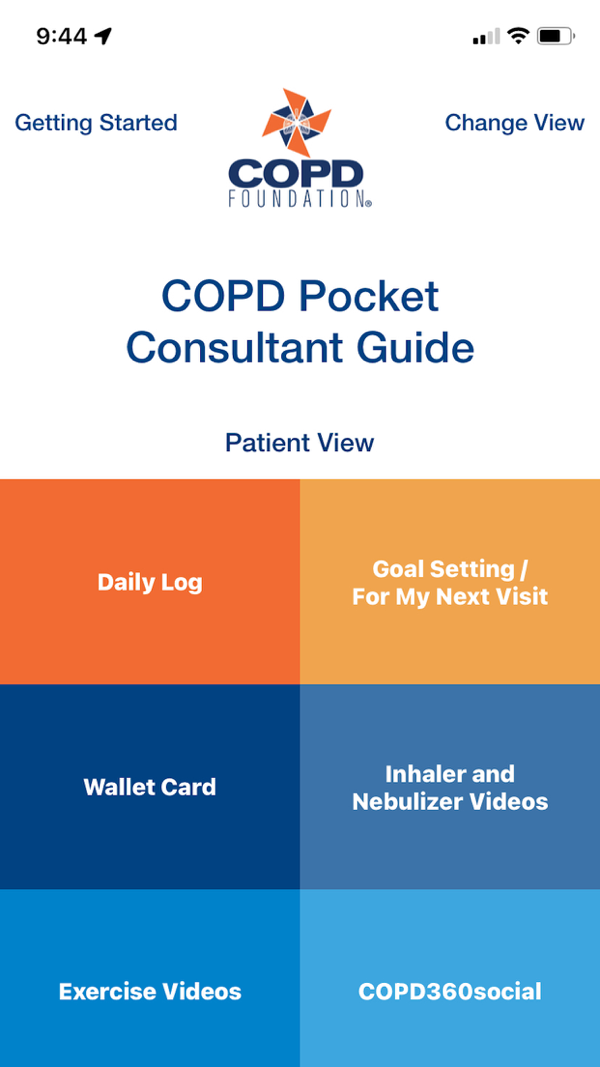
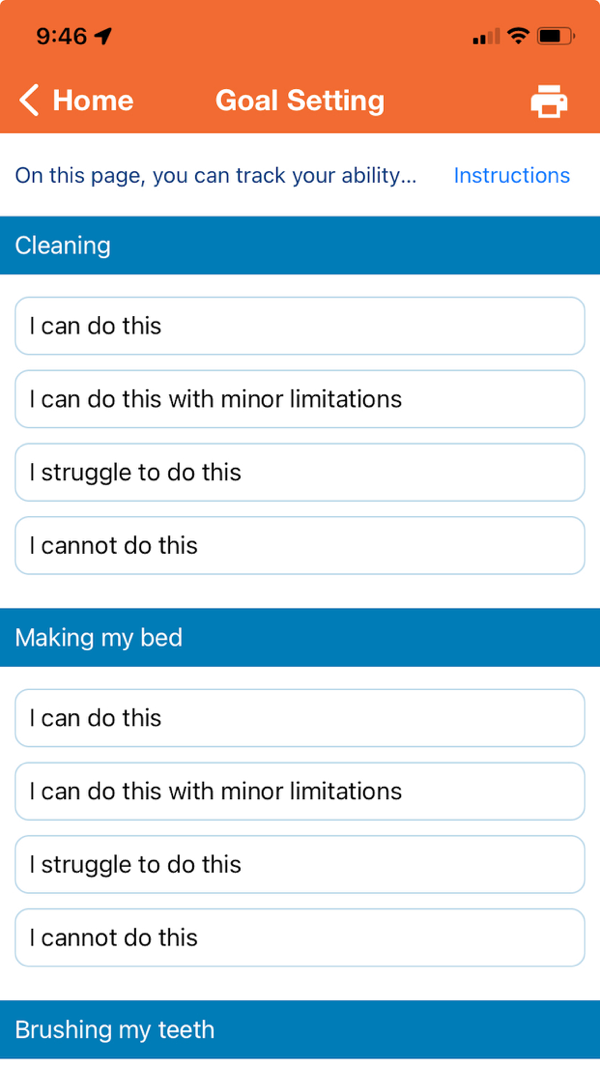
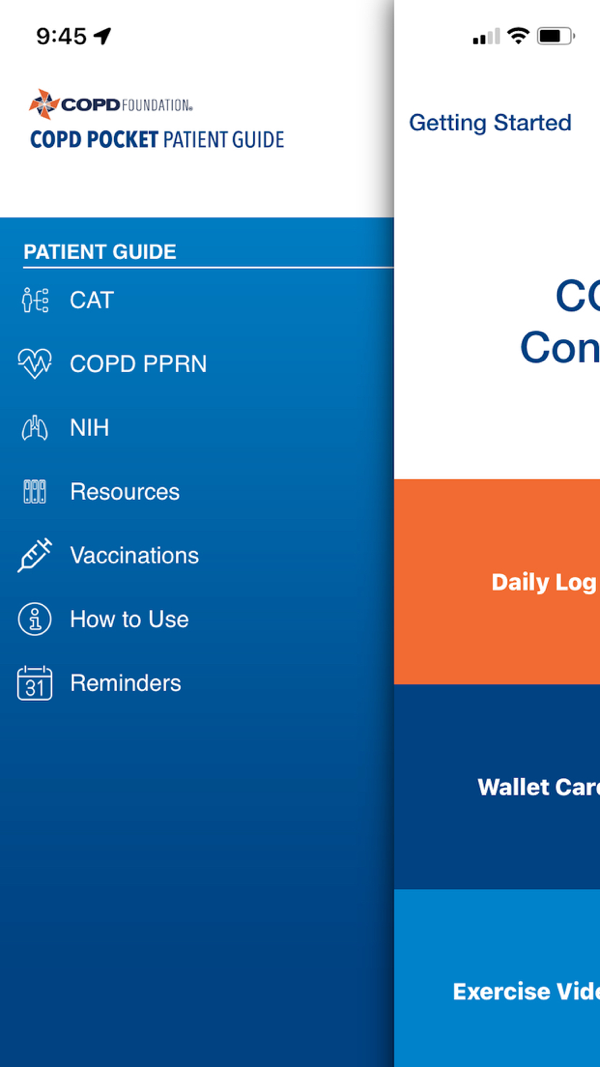
COPD Pocket Consultant Guide screens from its App Store listing.
The COPD Foundation’s Pocket Consultant Guide, or PCG, has a dedicated patient and caregiver track, free on iPhone and Android.
Its Daily Log holds My COPD Action Plan with green, yellow and red day outcomes (COPD Foundation).
Say a pulmonology visit is two weeks away. Your dad rates everyday jobs in Goal Setting and adds questions under For My Next Visit.
- Videos show inhaler, nebulizer and exercise technique.
- Goal Setting rates everyday jobs like cleaning or making the bed.
- A For My Next Visit page collects visit questions for the appointment.
- A wallet card holds medications and immunizations.
With those pages printed the night before, the conversation starts from his own notes.
The trade-off: PCG is an educational guide, and its green, yellow and red steps come from the plan your clinician writes with you.
Fill in the action plan together at the next appointment, then keep a printed copy where helpers can find it. The App Store listing shows an older update, so test saving and reopening one entry first.
- Best for
- A free daily record and action plan to review with the care team. Explore the patient track.
- Price
- Free.
- Platforms
- iPhone and Android.
- Caregiver sharing
- Printable log, action plan and visit questions to hand to helpers.
- Provider
- COPD Foundation, a nonprofit.
Share the COPD Plan With Everyone Helping
Save the action plan in Documents and rehab classes on the Calendar, so every helper opens the same version.
Create Your Village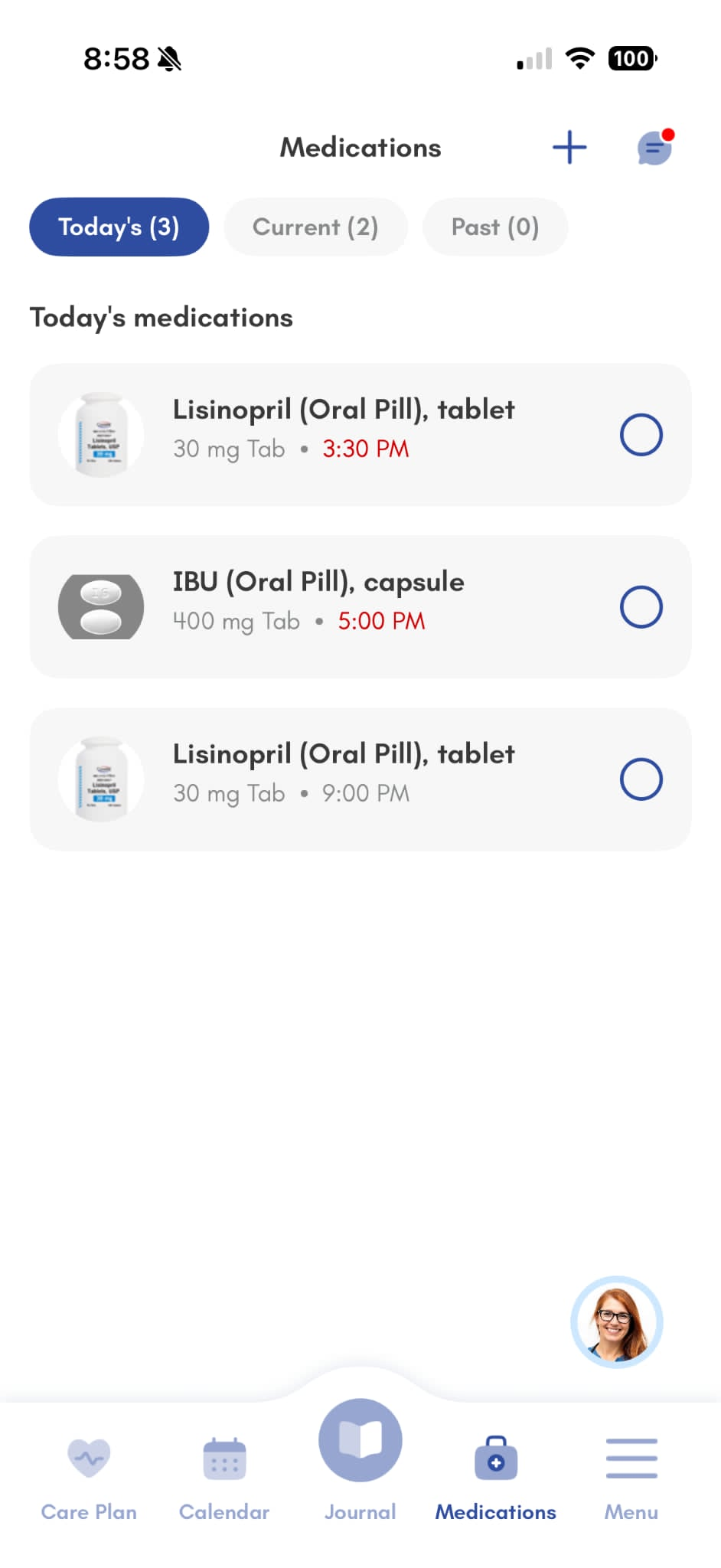
3. myCOPD: Best for Structured Self-Management Through a Care Program
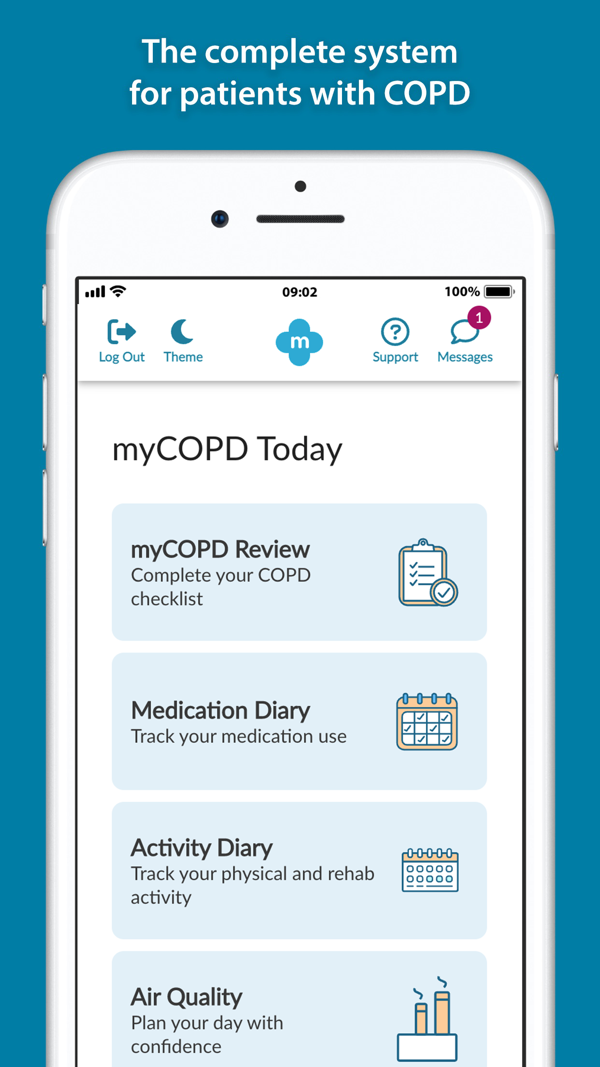
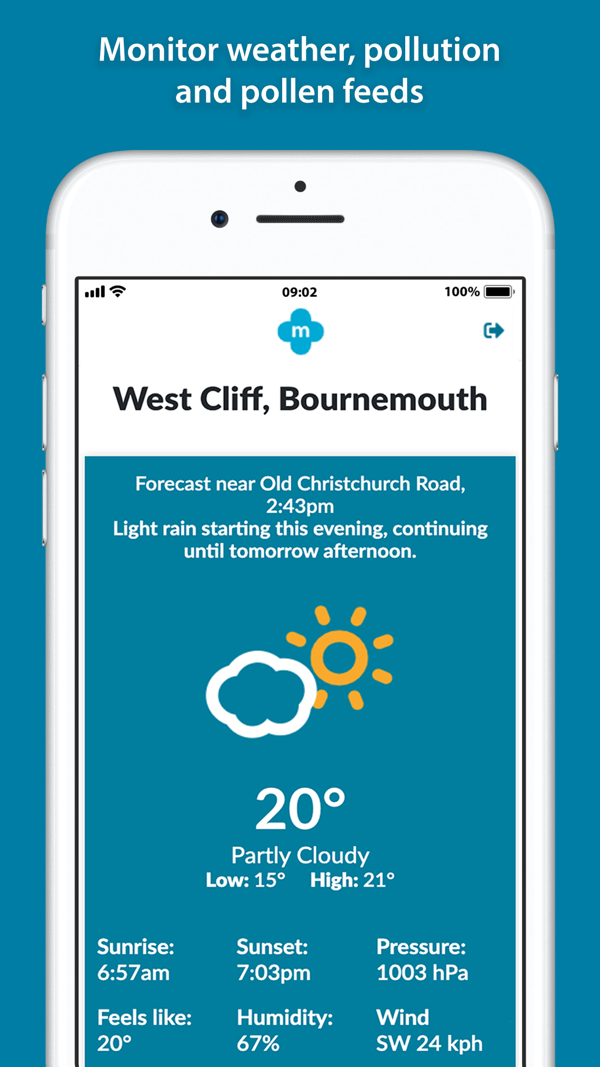
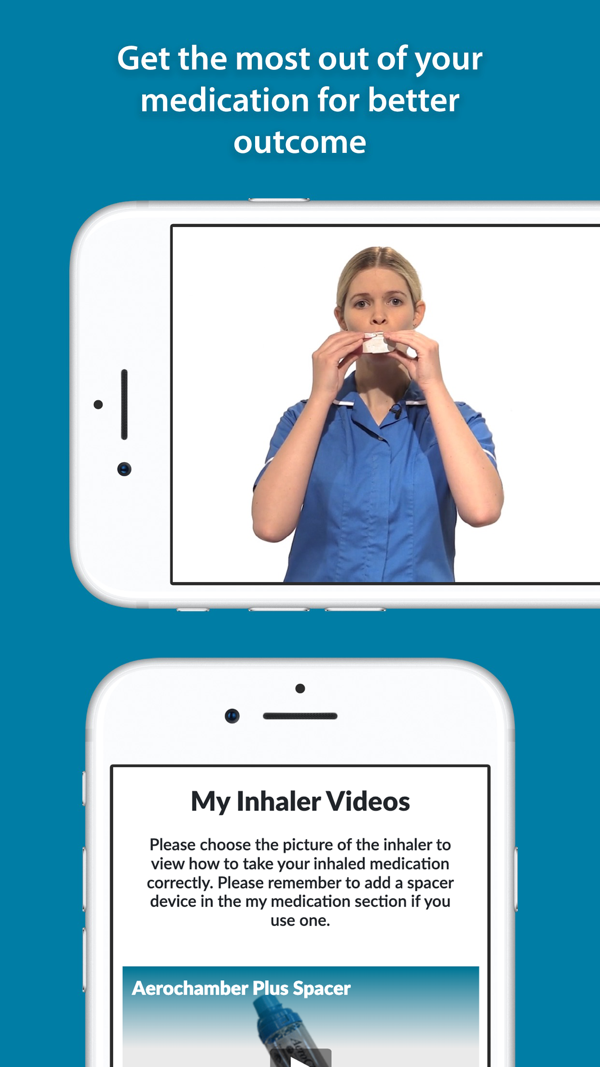
myCOPD screens from its App Store listing.
myCOPD, from my mhealth, lives inside the my mhealth app, with iPhone, Android and web access (my mhealth).
The COPD module bundles an education course, online pulmonary rehabilitation and a self-management plan (product page).
On a rehab day, the Today screen lines up a COPD review checklist, the diaries and an air quality card. For someone doing rehab at home, that turns a vague goal into a short daily routine.
- Inhaler videos let the person pick their own device and watch the technique.
- A medication diary logs doses beside an activity diary for exercise.
- Local weather and pollution forecasts help plan each outing.
- The optional COPD 360 community, run by the COPD Foundation, adds peer support.
The trade-off is access. The product pages describe the features and leave the enrollment route to your program, so ask the care team or health plan who activates myCOPD and what you pay.
Setup asks for the COPD medications, so have the current list and inhaler names ready (setup steps). Then try one full Today routine together.
- Best for
- Someone whose clinician supports a structured rehab and education program. Ask about myCOPD access.
- Price
- Free download; program access and fees vary by care program.
- Platforms
- iPhone, iPad, Android and web.
- Caregiver sharing
- Personal account; ask the program team about family access.
- Provider
- my mhealth, a digital health company.
4. EPA AirNow: Best for Checking Air Quality and Smoke Before Outings
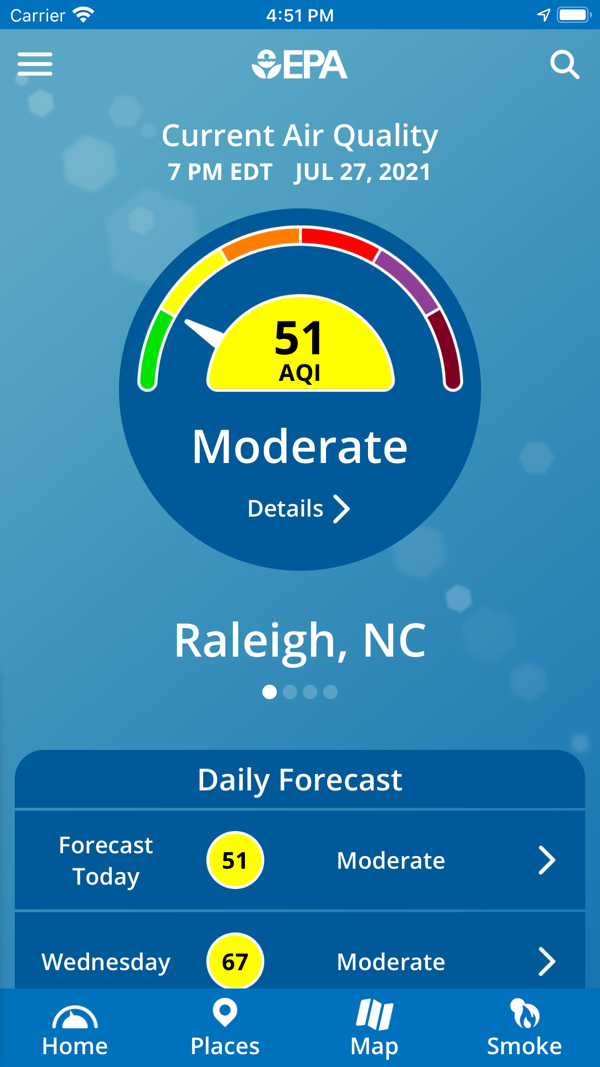
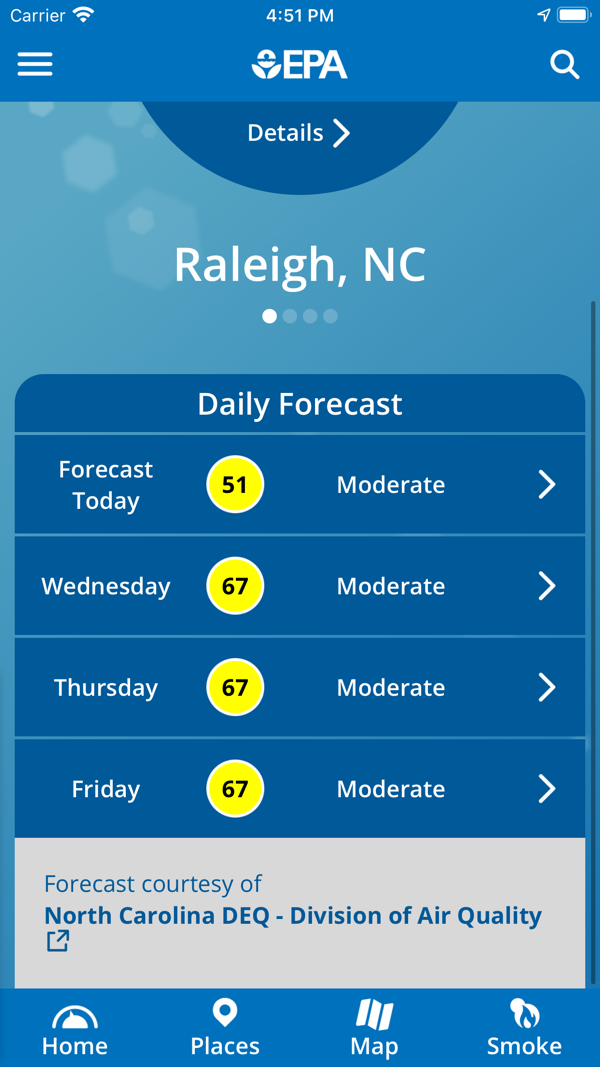
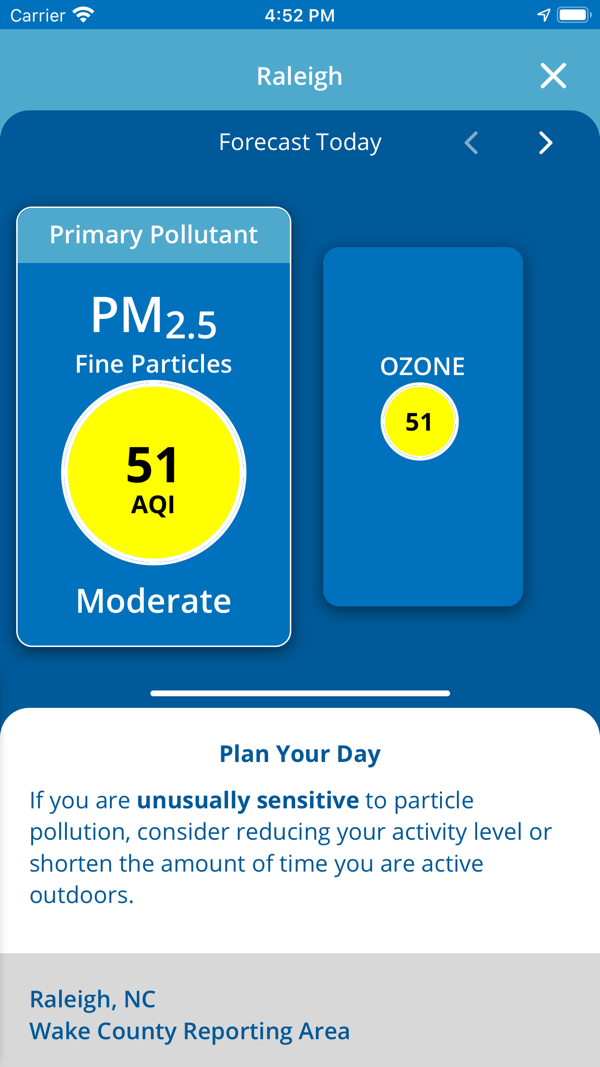
EPA AirNow screens from its App Store listing.
EPA’s free AirNow app shows the current Air Quality Index for your area as soon as it opens.
Before a Thursday walk or the drive to rehab, a caregiver checks today’s reading for home and the clinic town.
- A forecast covers the days ahead in any area you choose.
- The map shows PM2.5, PM10 and ozone monitors across North America.
- A smoke icon opens the Fire and Smoke Map (AirNow).
- Saved places make a ten-second check (app features).
It suits a loved one who already has enough journals to keep. In smoke season, a second look at the Fire and Smoke Map before a long drive keeps the day’s plan realistic.
The trade-off: AirNow reports outdoor air at monitoring sites, so it describes the neighborhood, while breathing and indoor air call for their own checks.
Pair the AQI with the activity guidance in the clinician’s plan. Setup takes one step: save home, the clinic and each family address. When every helper saves the same places, whoever drives sees the same reading.
- Best for
- A quick daily air-quality check that any helper can do. Get EPA AirNow.
- Price
- Free.
- Platforms
- iPhone and Android.
- Caregiver sharing
- Public data; each helper can install it and save the same places.
- Provider
- Environmental Protection Agency (EPA).
5. Hailie: Best for Recording Inhaler Use With a Compatible Sensor
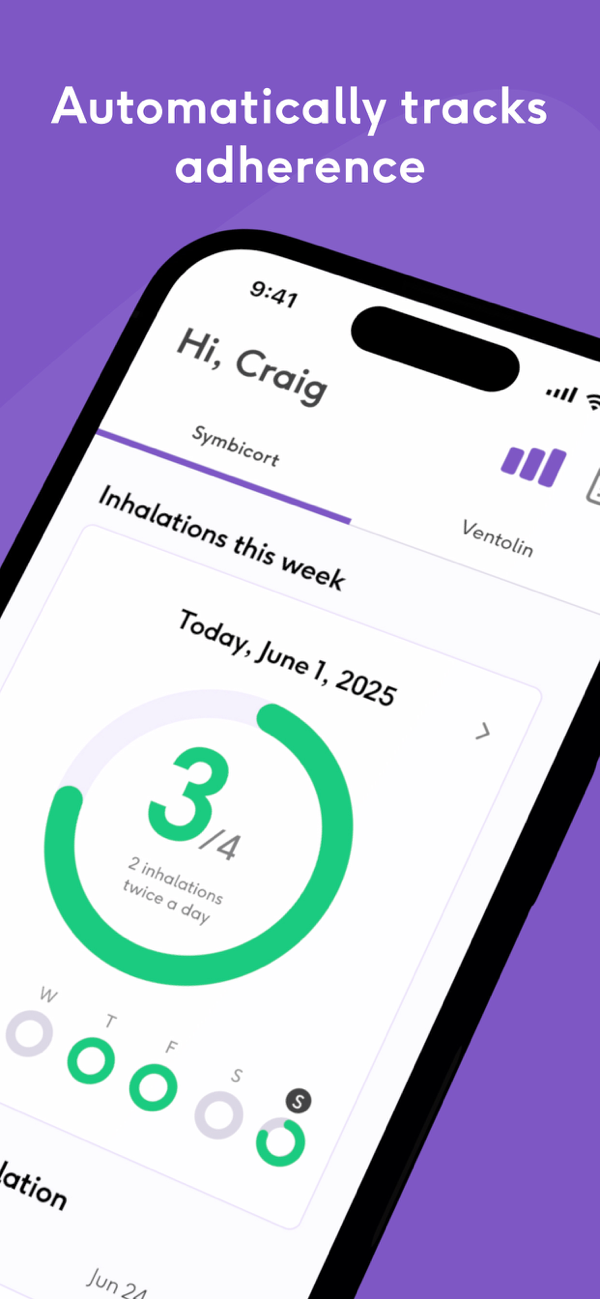
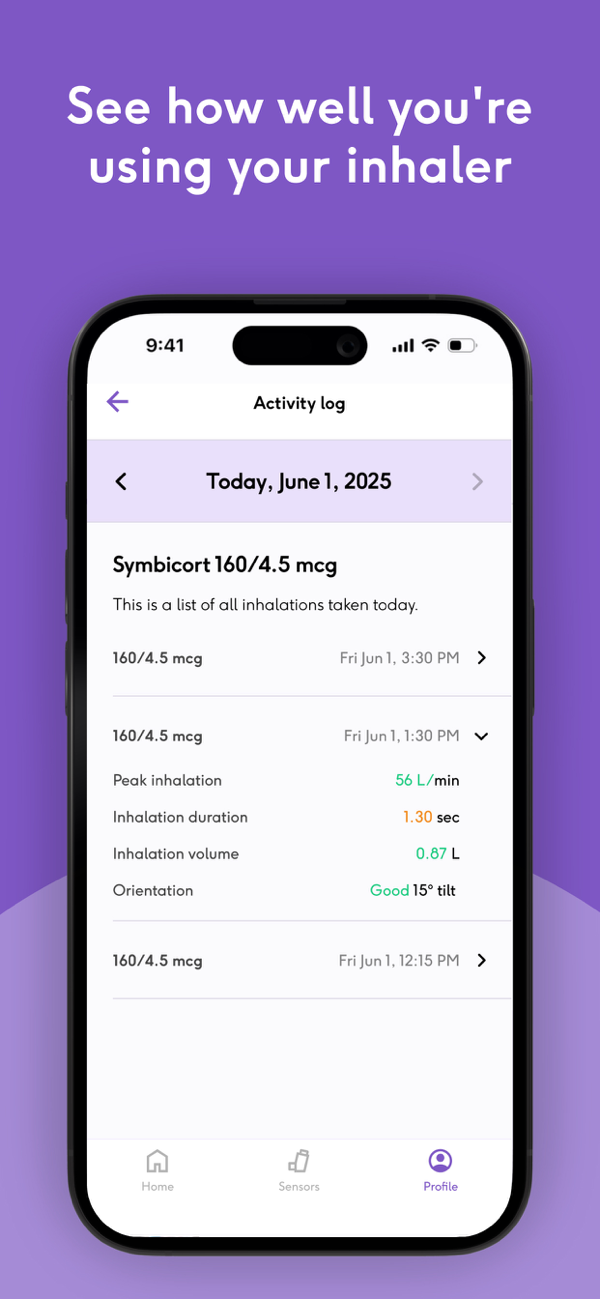
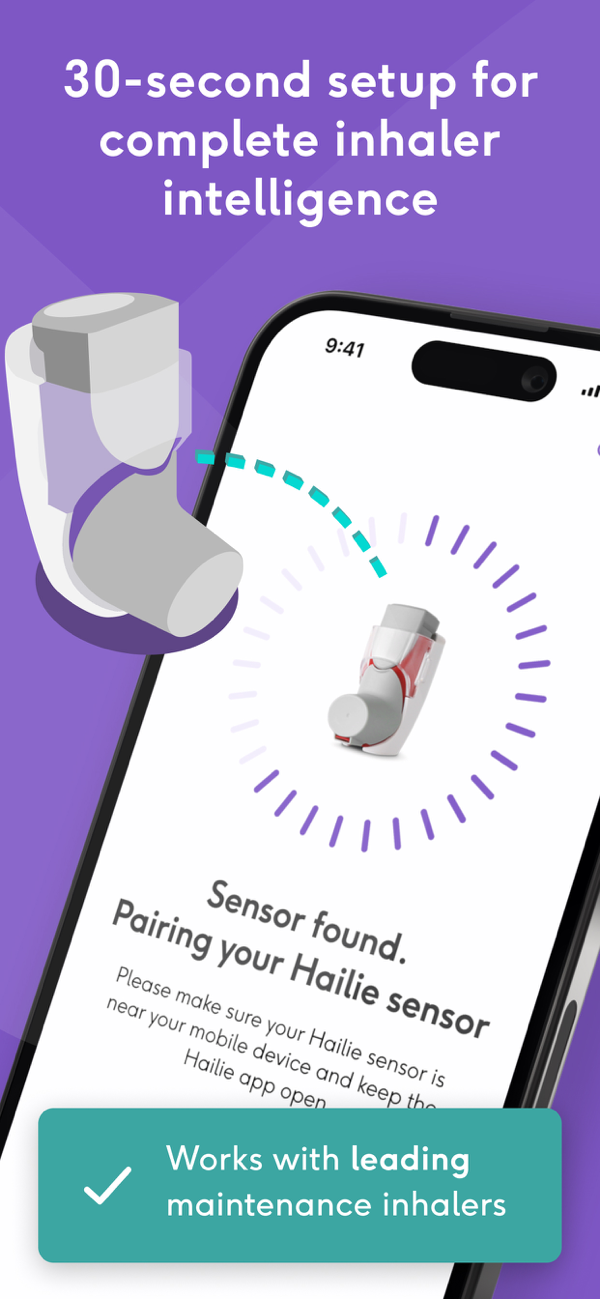
Hailie Care screens from its App Store listing.
Hailie, from Adherium, pairs a small sensor with the free Hailie Care app.
The sensor attaches to a supported inhaler and logs each dose automatically, with a technique score, for controller and rescue inhalers (App Store).
Usage travels over Bluetooth to the app and to a portal your clinician can review between visits (Hailie).
- The activity log gives each puff a time stamp.
- A weekly ring shows planned inhalations taken, day by day.
- The clinician sees a record built by the device itself.
- Controller and rescue inhalers each get their own record.
Think of a spouse who keeps asking about the morning puffs, or a loved one unsure whether the rescue inhaler came out overnight. The time-stamped log answers both questions.
The trade-off is hardware. Each sensor matches a specific inhaler model, and sensors sell online through the brand's own Hailie store.
Confirm the exact inhaler model and total cost first. Then ask the clinician how they read technique scores and who on the family side may view the data.
- Best for
- An inhaler-use record with a supported device and care-team involvement. Check Hailie sensor options.
- Price
- App free; confirm the sensor cost for your inhaler.
- Platforms
- iPhone (iOS 17.6 or later); help center lists Google Play.
- Caregiver sharing
- Metrics go to the care team; ask about family viewing.
- Provider
- Adherium, a respiratory technology company.
6. Wellinks: Best for Coaching and Home Devices Through an Eligible Program
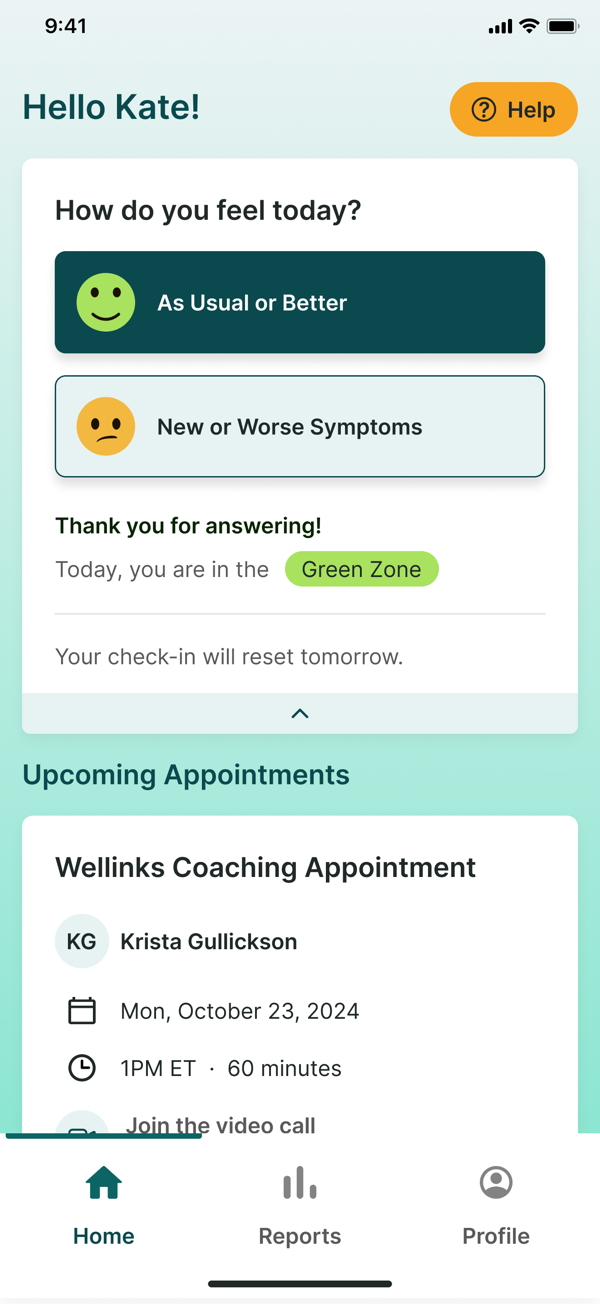
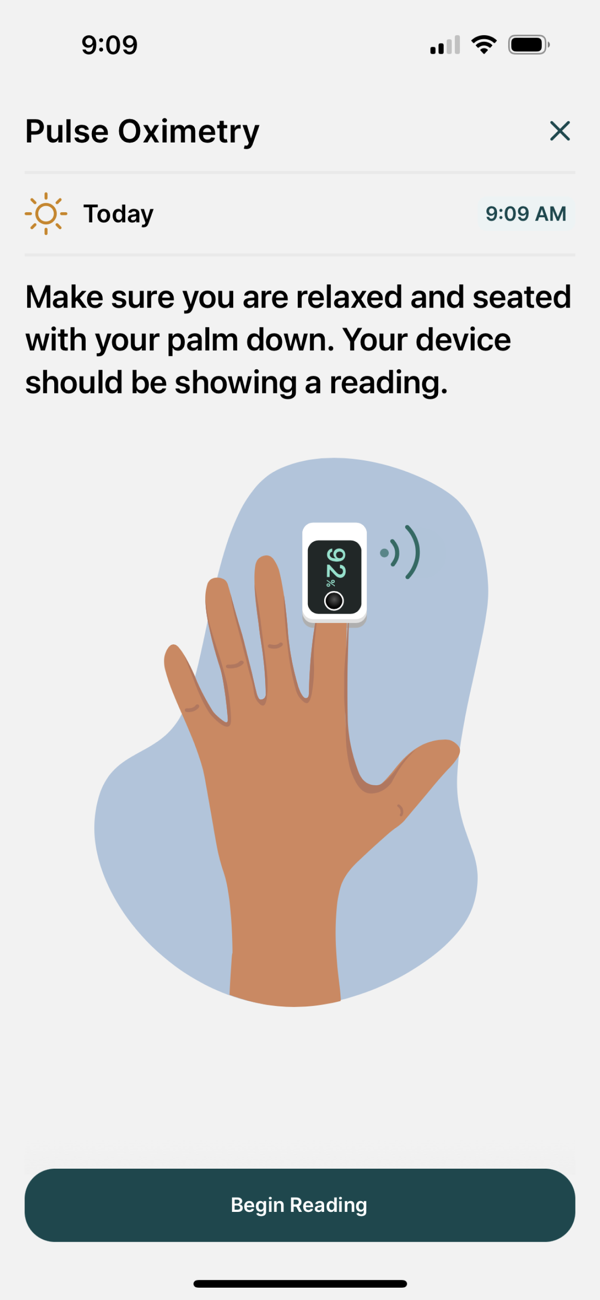
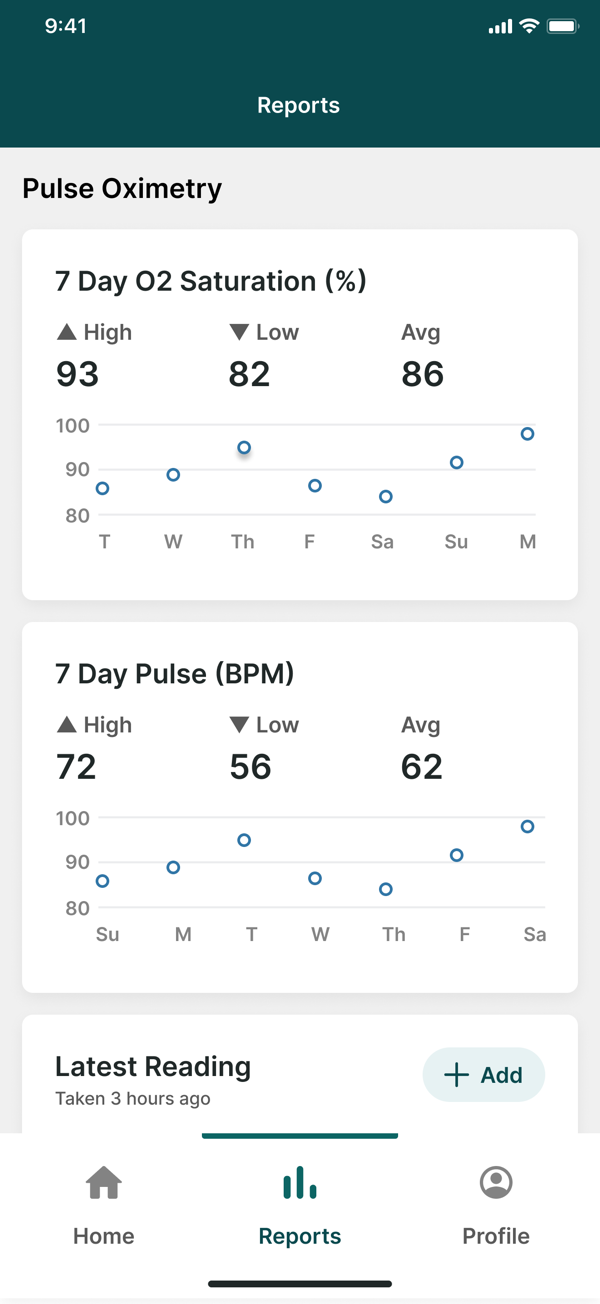
Wellinks screens from its App Store listing.
Wellinks is a virtual respiratory care program with an app.
Eligible members get a welcome kit of home monitoring devices, 1:1 coaching and virtual pulmonary rehabilitation (Wellinks).
In the first week, a coach helps set up the welcome kit devices, so the first readings reach the care team.
- Respiratory specialists and nurses back each member’s coaching.
- A 24/7 nurse triage line coordinates care between visits.
- A virtual support group connects people living with chronic respiratory disease.
- Bluetooth devices pair through the app, with support articles for connection trouble.
In the app, the home screen asks how your loved one feels today, then shows the zone for that answer, the next coaching appointment and a guided pulse oximetry reading.
Reports chart seven days of oxygen saturation and pulse, which gives the coach and your loved one something concrete to discuss at each call (App Store).
The trade-off is eligibility: call enrollment at 1-877-220-9465 to check whether you qualify, and ask which devices, costs and family involvement your plan includes (Wellinks). Write those questions down before you call.
- Best for
- People eligible for a supported respiratory care program. Check Wellinks eligibility.
- Price
- Confirm coverage and costs with the enrollment team.
- Platforms
- iPhone and Android app, plus video visits, calls and texts.
- Caregiver sharing
- The care team sees readings; ask about family involvement.
- Provider
- Wellinks (Convexity Scientific), a virtual respiratory care company.
7. COPD Manager: Best for an iPhone or iPad Symptom Journal
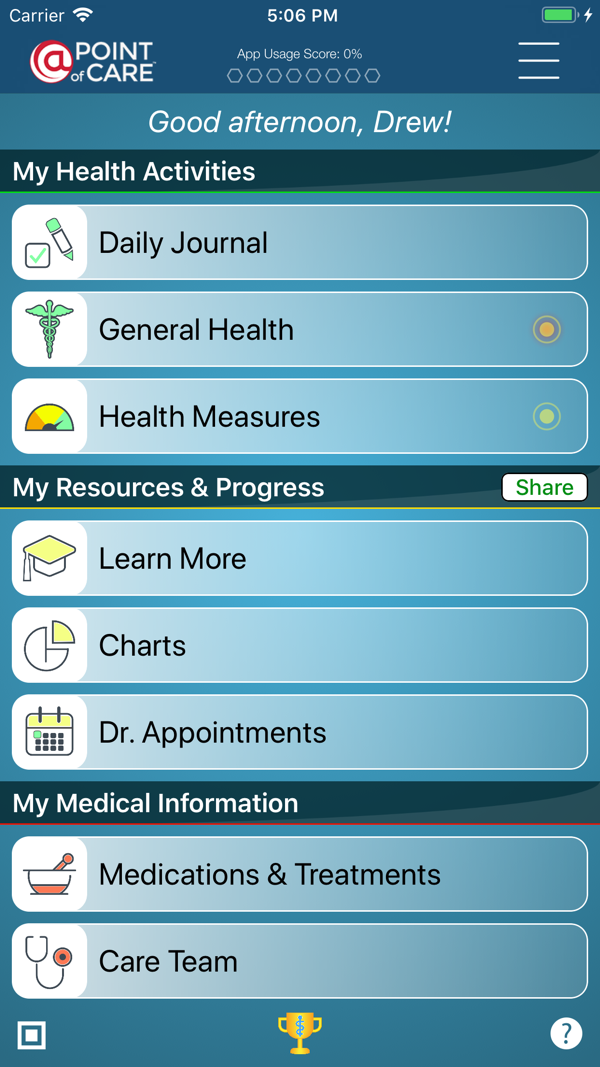
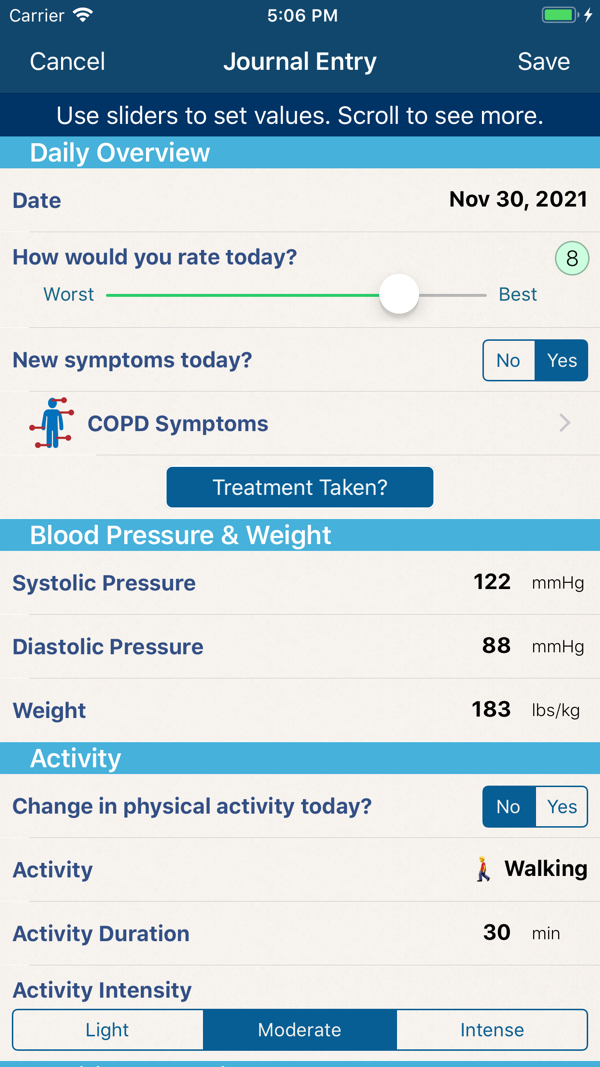
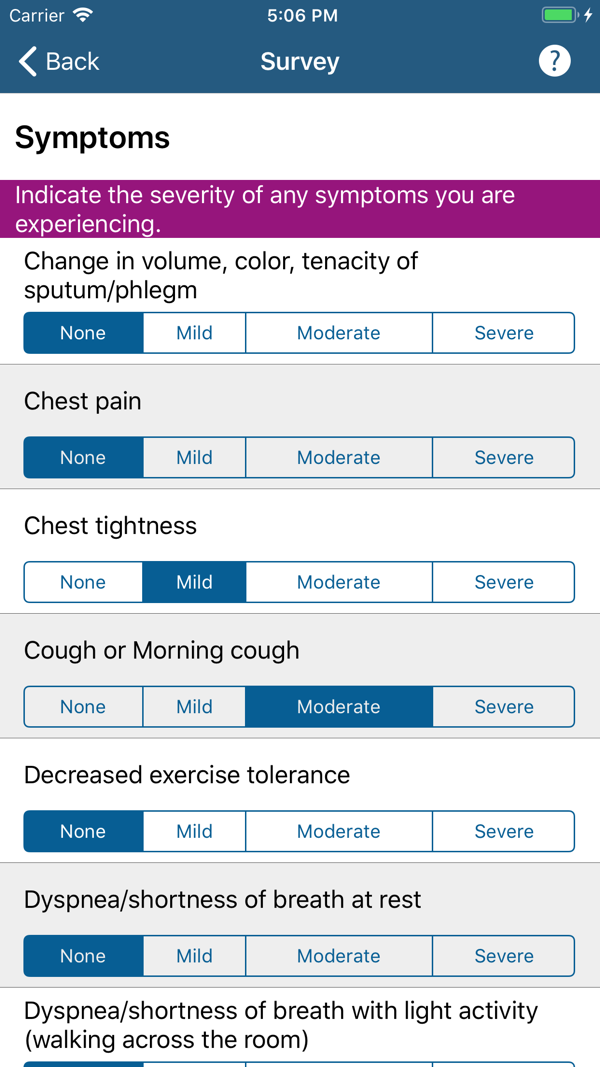
COPD Manager screens from its App Store listing.
COPD Manager, from @Point of Care, is a free daily journal for symptoms, mood, pain and medications.
Its sliders turn each day into charts of mood, pain, medications and journaling frequency (App Store).
- Entries export and charts print for appointments (listing details).
- Medication reminders sit alongside, and tapering schedules go straight onto the calendar.
- Caregivers connect to the account by QR code.
- A photo upload helps show a visible symptom to the care provider.
- The Learn More section carries printable COPD education for the family folder.
Before a pulmonology visit, your mom fills in the symptom survey on her iPad, from chest tightness to morning cough. You print last month’s chart together, so the visit starts from her own record.
The trade-off is track record: the app is built for iPad and iPhone, and the App Store listing shows 2.0 from four ratings, a small sample (App Store).
Register, save one entry and reopen it on the same device before making it the main record. The latest version is 11.0.9.
- Best for
- An Apple-device user who wants a personal journal to print for visits. View COPD Manager.
- Price
- Free.
- Platforms
- iPhone and iPad (iOS 14 or later).
- Caregiver sharing
- Caregivers and care providers connect by QR code.
- Provider
- @Point of Care, a health software publisher.
A Green, Yellow and Red Day Sharing Plan for Families
Use the zones and actions your clinician has written (COPD Foundation). The table covers who calls and who updates.
| Day in Your Plan | Person With COPD | Caregiver and Contacts | Keep Handy |
|---|---|---|---|
Green | Follow the usual plan; log the day if helpful. | Check air quality for outings; share the usual update. | Current medication list. |
Yellow | Follow the care team’s written yellow-day steps. | Make the calls the plan specifies; check supplies. One named helper updates the family afterward. | Action plan, care-team number and medication list. |
Red | Get emergency help as the plan directs. Call 911 for an emergency. | Get help first and brief responders; notify agreed contacts afterward. | Action plan, medication list, ID and insurance details. |
Keep a paper backup and name a stand-in helper. The family emergency information checklist organizes the documents.
Keep Helpers Informed After Care Is Arranged
Post one Wellness Journal update after the care-team call, so siblings and neighbors read the same news and see their task.
Create Your Village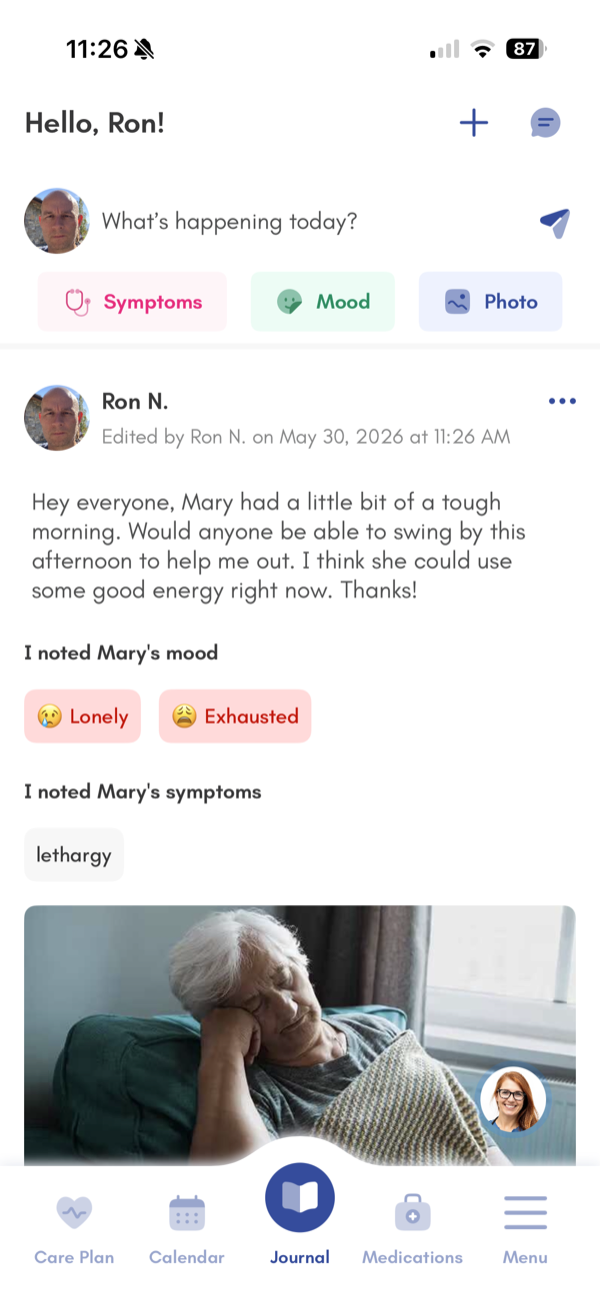
Five Privacy Questions Before Installing a COPD App
- What does the store disclose? Read App Privacy or Data safety; declarations can change.
- Where does health information go? Check sale, sharing and advertising terms.
- Who gets access? Agree permissions for relatives, clinicians and health plans together.
- Can you export and delete records? Find the process before relying on the app.
- Who provides support? Check the publisher and contact route.
Caring Village keeps health information private to the members you invite, with role-based access for each person in the village.
COPD App FAQs
Is There a Free COPD App?
Yes. The COPD Pocket Consultant Guide is free, and EPA AirNow and COPD Manager are free downloads.
Can Family Members See COPD App Data?
COPD Manager lets caregivers connect by QR code, Hailie and Wellinks share with the care team, and PCG pages print. For broader options, compare caregiver apps for families.
Can an App Tell Whether COPD Is Getting Worse?
Treat app data as notes for the care team. Follow the clinician’s action plan, and call 911 for an emergency.
What If My Loved One Prefers Paper?
Keep the paper record and start with one helper task, like checking air quality. See caring for someone with COPD.
Which COPD App Covers Which Job?
| Job | Documented App Support |
|---|---|
Daily symptom or action-plan record | PCG; myCOPD; COPD Manager. |
Inhaler instruction videos | PCG; myCOPD. |
Recording inhaler use | Hailie sensor; myCOPD medication diary. |
Air quality and smoke planning | AirNow; myCOPD forecasts. |
Rehabilitation or guided exercise | myCOPD; Wellinks; PCG exercise videos. |
Medications, appointments and documents | Caring Village; PCG wallet card. |
Updating relatives | Caring Village Wellness Journal; COPD Manager QR code. |
Agree who copies updates between apps. See medication reminder apps and long-distance caregiving tips.
The Bottom Line
Set up one task today: save the action plan, try a journal entry or check air quality. Then name who keeps shared information current.
Make COPD Care a Team Effort
Caring Village brings appointments, care documents and family updates together.
- Shared calendar, to-dos and messaging, free.
- Medication list and care documents together.
- Trusted by 85,000+ families.
Rated 4.6 stars on the App Store.
This App has been a life saver! I don't know where we would be without it! My Mom's care has been changing a lot lately and we have been able to communicate the changes in real time.
