


5 Best Dementia Clocks for Daily Routines
American Lifetime Day Clock spells out morning, afternoon and night in words, which suits a loved one who asks whether it is morning or night. JALL adds routine alarms, Day Connect keeps a quiet text display, Idem lets family update reminders remotely and Robin speaks the time aloud. Choose by what they can read from their usual seat. Caring Village keeps the routine behind the clock in one family calendar.

Updated
Quick Comparison: 5 Dementia Clocks at a Glance
| Rank | Clock / Best For | Price | Display | Reminders | Power / Ongoing Cost |
|---|---|---|---|---|---|
| 1 | American Lifetime Day Clockmorning/night | 8-inch; day/date and time-of-day words | Plug-in; settings backup; $0 ongoing | ||
| 2 | JALL 8-Inch Day Clockroutine alarms | 8-inch; day/date, AM/PM, period icon | 12 custom alarms | Plug-in; unspecified short-outage backup; $0 ongoing | |
| 3 | Relish Day Connectplain-words display | 7-inch; day/date and text or icons | Task alerts require separate Day Hub | Plug-in; settings backup; Wi-Fi optional; $0 ongoing | |
| 4 | Idem Smart Clockremote reminders | 10.1-inch; day/date and time-of-day words | Managed through companion app | ||
| 5 | Robin Premium DayClockspoken reminders | 8-inch base; larger options extra | Custom messages; spoken time | Plug-in; time/date backup; $0 ongoing |
 American Lifetime Day Clock
 JALL 8-Inch Day Clock
 Relish Day Connect
 Idem Smart Clock
 Robin Premium DayClock
AlzStore generally requires new, unused returns with authorization within 30 days and customer-paid postage. Refund fees are 25%, up to 50% for opened or damaged goods, so plan any home trial around the return window. Find your situation.
What to Look for in a Dementia Clock
Compare readability, time-of-day cues, dimming, alarm control, outage behavior and total cost. Written reminders suit people who still read. Pick the clock for the confusion you see, then the features.
These picks come from manufacturer pages, manuals and seller listings.
The 5 Best Dementia Clocks
1. American Lifetime Day Clock: Best Overall for Morning and Night Mix-Ups
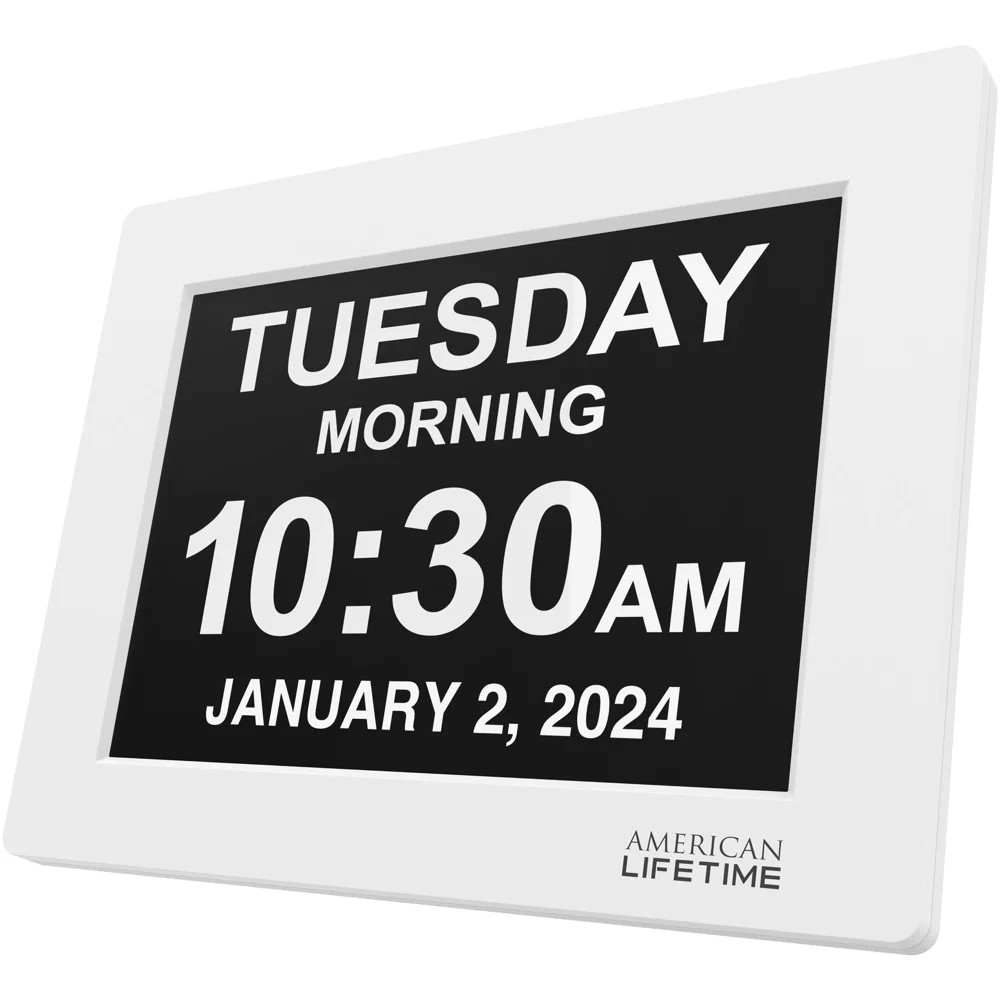
American Lifetime white 8-inch Day Clock. Brand photo.
American Lifetime answers the morning-or-night question in words: the screen shows the weekday, the full date, the time and one of five time periods, from Before Dawn to Night.
- Trims the screen to one line in Basic mode, such as “Now it's Saturday morning.”
- Dims automatically from 7 p.m. to 7 a.m., so the room stays dark.
- Holds the time and alarms through an outage with a backup battery.
- Arrives in packaging with zero mention of dementia, which helps when it is a gift.
- Reads from up to 20 feet, in eight display languages.
Picture a father who wakes from a nap and starts dressing for breakfast. A glance at the clock reading Afternoon settles the question before anyone calls his daughter.
The trade-offs are power and daylight saving. The clock needs its outlet to stay lit, and daylight-saving changes are manual, so assign a helper for March and November.
- Best for
- Morning and night mix-ups in a familiar clock format.
- Key specs
- 8-inch display readable up to 20 feet; five time periods; five alarms with medication messages; auto-dimming; eight languages; kickstand or wall mount.
- Provider
- American Lifetime, brand and direct seller.
2. JALL 8-Inch Calendar Day Clock: Best for Routine Alarms
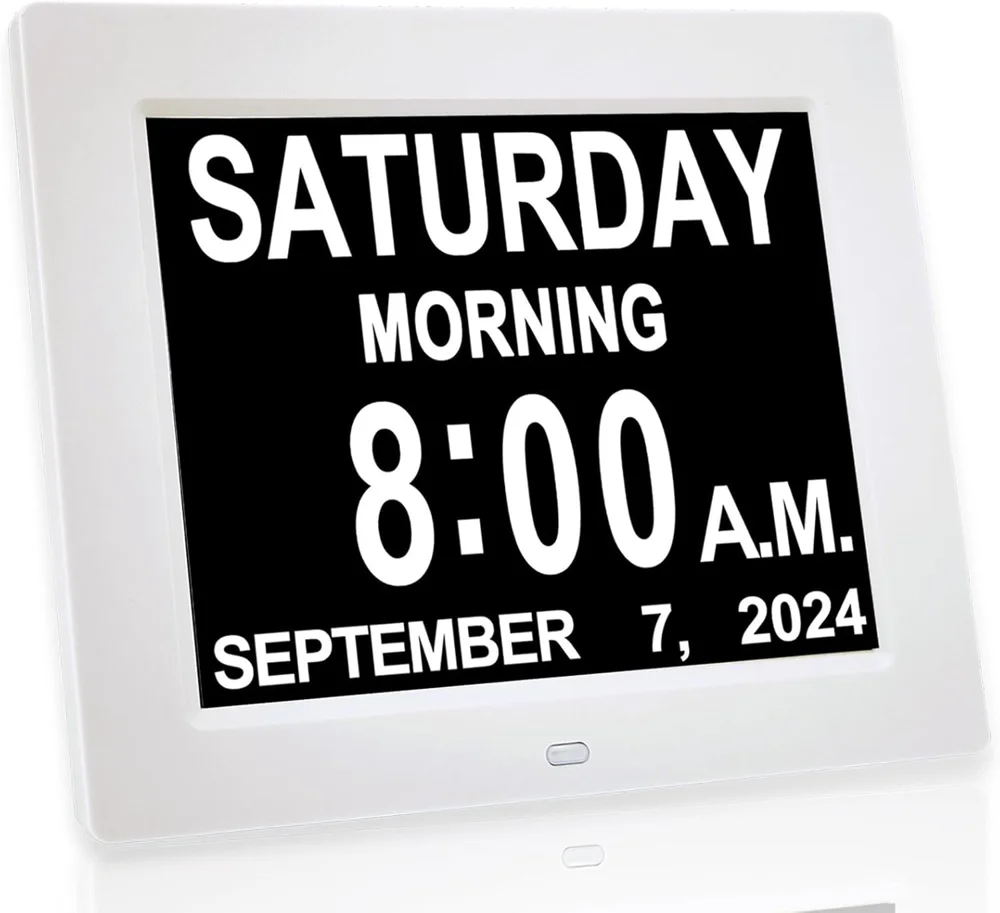
JALL white 8-inch model showing Saturday morning. Brand photo.
JALL's 8-inch clock spells out the weekday, month and date with AM and PM and a five-part time-of-day icon. It suits a household where the right activity keeps happening at the wrong hour.
- Holds 12 independent alarms plus optional hourly chimes.
- Reads clearly from across the room on a wide-angle IPS screen.
- Auto-dims from 7 p.m. to 7 a.m., with five manual brightness levels.
- Doubles as a digital photo frame for family pictures.
A daughter might set one alarm at 11:30 for lunch and another at 4 p.m. for a short walk around the block.
Start with one meaningful prompt, watch whether it helps, then add the next. Simple written reminders suit someone who can still read, and a string of alarms can interrupt rest.
JALL advertises a backup for short power interruptions with an unstated runtime, so plan for steady outlet power and confirm the display modes you want.
- Best for
- Several selective prompts set up by a caregiver.
- Key specs
- 8-inch IPS screen; AM/PM and five-period icon; 12 alarms plus hourly chime; auto-dimming with five brightness levels; photo-frame mode; several languages.
- Provider
- JALL, brand and direct seller.
3. Relish Day Connect: Best Plain-Words Display From a Dementia Specialist Maker
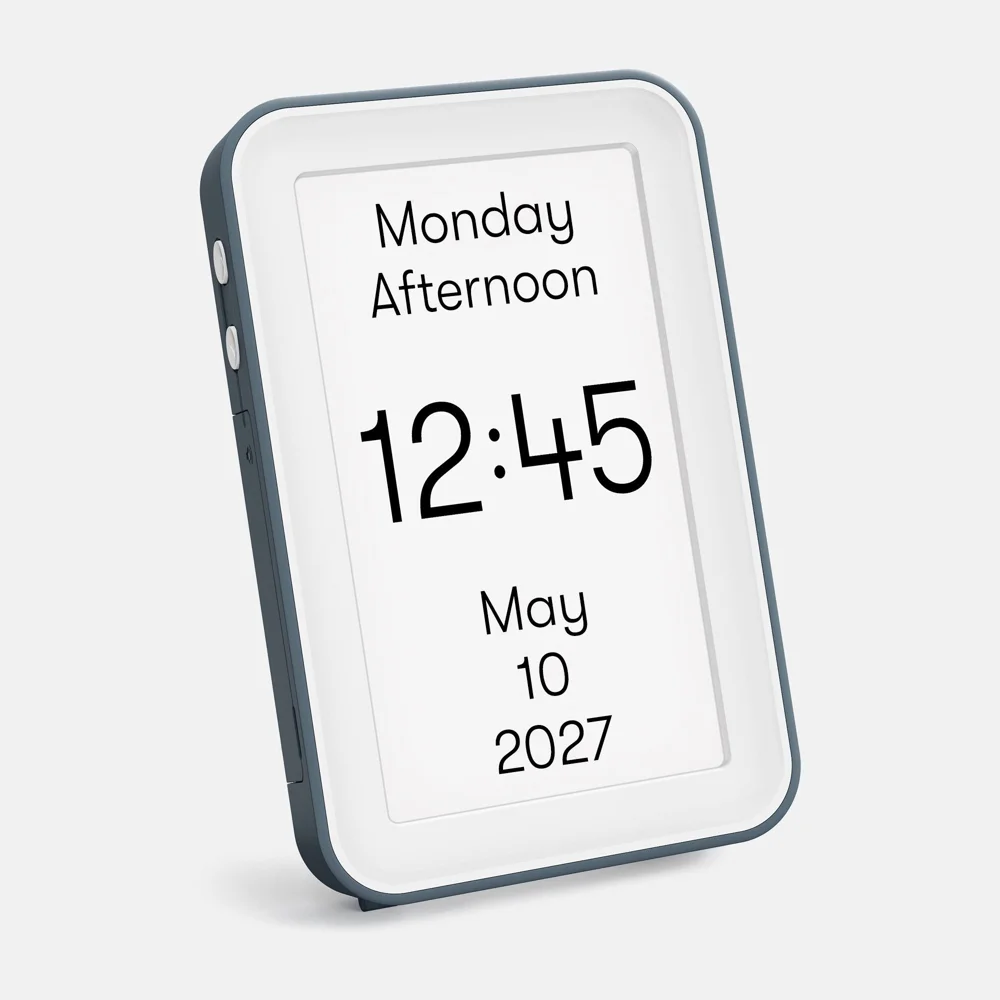
Relish Day Connect showing Monday afternoon. Brand photo.
Day Connect comes from Relish, a maker of dementia products, and puts the day, date and time on a tall 7-inch screen.
- Shows the time of day as text, an icon or off, set in the Settings menu.
- Offers four colour combinations for daylight and lamplight.
- Dims at night and adjusts for daylight saving on its own, per Relish.
- Runs on its power adapter, offline or on Wi-Fi, and its backup saves the settings during an outage.
Plain words suit someone who finds sun and moon pictures confusing. A mother who keeps asking whether it is evening can read “Wednesday Evening” in large letters from her armchair.
Task alerts arrive through a separate Day Hub, an added purchase, so budget for the hub when reminders matter for meals or medication.
Pick the colour combination with your loved one in their usual chair, then check the screen again under evening lamplight.
- Best for
- Quiet words and adjustable contrast.
- Price
- $119.99 at The Alzheimer's Store (model 0054-0001).
- Key specs
- 7-inch LCD; time of day as words, icon or off; four colour schemes; automatic dimming and daylight saving; works offline or on Wi-Fi; Day Hub sold separately for task alerts.
- Provider
- Relish, maker; The Alzheimer's Store, retailer.
4. Idem Smart Clock: Best When Family Manages Reminders From Afar
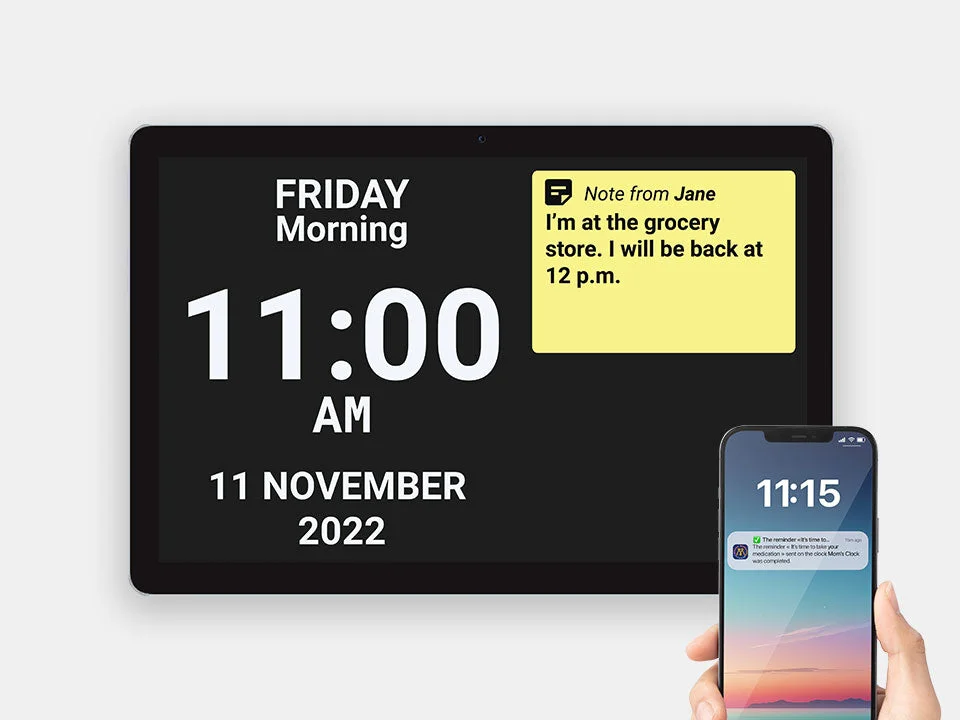
Idem Smart Clock and illustrative companion phone; phone not included.
Idem pairs a 10.1-inch touchscreen clock with a companion app, so a sibling in another state can send and update reminders, notes and messages from a phone.
- Shows the day, date, time and time of day on one screen.
- Asks for a yes/no tap on reminders, so family sees they were seen.
- Runs 6 to 8 hours on battery power before it needs the outlet.
- Includes basic remote management on Wi-Fi for a $0 subscription.
Idem answers what happens next as well as the time. A note reading “Maria visits at 2” sets up the afternoon, and the family sees whether the morning reminder got a yes.
A tap shows the reminder was seen, so keep a person on medication checks.
Plan for a relative or neighbor nearby who can handle pairing and the occasional reset. The clock joins 2.4 GHz Wi-Fi, certain public networks may fail to connect, and video calling and cellular data cost extra.
- Best for
- Remote reminders with local setup support.
- Price
- $275 direct; optional video and data plans at $19 and $9 a month.
- Key specs
- 10.1-inch touchscreen; companion app for reminders, notes, messages and events; yes/no reminder replies; 2.4 GHz Wi-Fi; 6 to 8-hour battery.
- Provider
- Idem, brand and direct seller.
5. Robin Premium DayClock: Best for Customizable Spoken Reminders
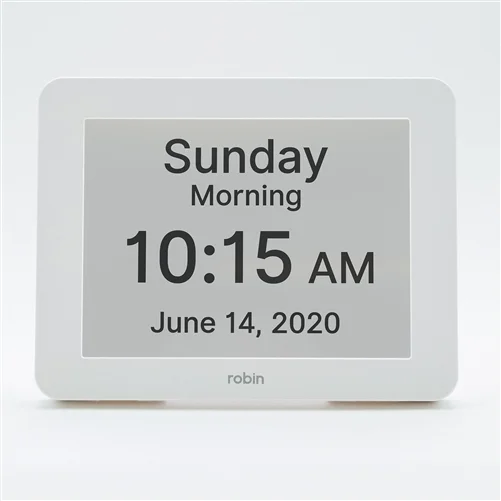
Robin DayClock showing Sunday morning. AlzStore product photo.
Robin speaks the day and time aloud at the press of one button, and it can announce the time on a schedule through the day.
- Carries custom messages on alarms with adjustable volume, length and sound.
- Adjusts for daylight saving time automatically, twice a year.
- Shows birthdays and holidays from more than 20 preloaded events, so visits land on the right day.
- Comes in larger 12 and 15-inch versions at The Alzheimer's Store, which cost extra.
A spoken cue helps someone whose reading is fading. A grandmother who struggles with the small numbers on a screen can press the button and hear the day and time.
Notice whether hearing the cue helps your loved one act, and begin quietly with one familiar message, such as the time lunch is ready.
More setup choices mean more for a helper to configure, so plan one setup session with the person who visits most often.
- Best for
- A spoken cue alongside readable text.
- Price
- $59.95 for the 8-inch white clock direct from Robin; The Alzheimer's Store lists the Premium DayClock from $79.95.
- Key specs
- 8-inch color display with a 170-degree viewing angle; talking day and time button; custom alarms and messages; automatic daylight saving; battery backup that restores time and date.
- Provider
- Robin, brand and direct seller; The Alzheimer's Store, retailer.
Set Up the Clock So It Helps
Observe usefulness over two weeks; address safety concerns immediately. Include placement when setting up a dementia-friendly home.
- Before day one: Ask where they want the new clock. Check it from bed or the usual chair, remove glare and keep its cord out of walking routes.
- Keep the display quiet: Choose the familiar language and time format. Where available, use time-of-day words and switch off distracting icons, photos or chimes. Start with zero alarms, or one prompt they understand.
- Check power and bedtime: Confirm the date, night brightness and what survives a brief unplug. Assign daylight-saving adjustments where they are manual.
- During days 1 to 14: Note whether they look at it on their own, whether questions ease, and whether sounds upset them or the clock gets hidden.
- At two weeks: Keep what helps, move or simplify the rest, and retire any aid that distresses them. Check the seller's return conditions before opening or trialing it.
Keep the Medication List Behind Every Alarm
Keep current and past medications and each helper's tasks in Caring Village, so everyone checking a dose follows the same list.
- Current and past medications in one list
- Helpers see the same list as you
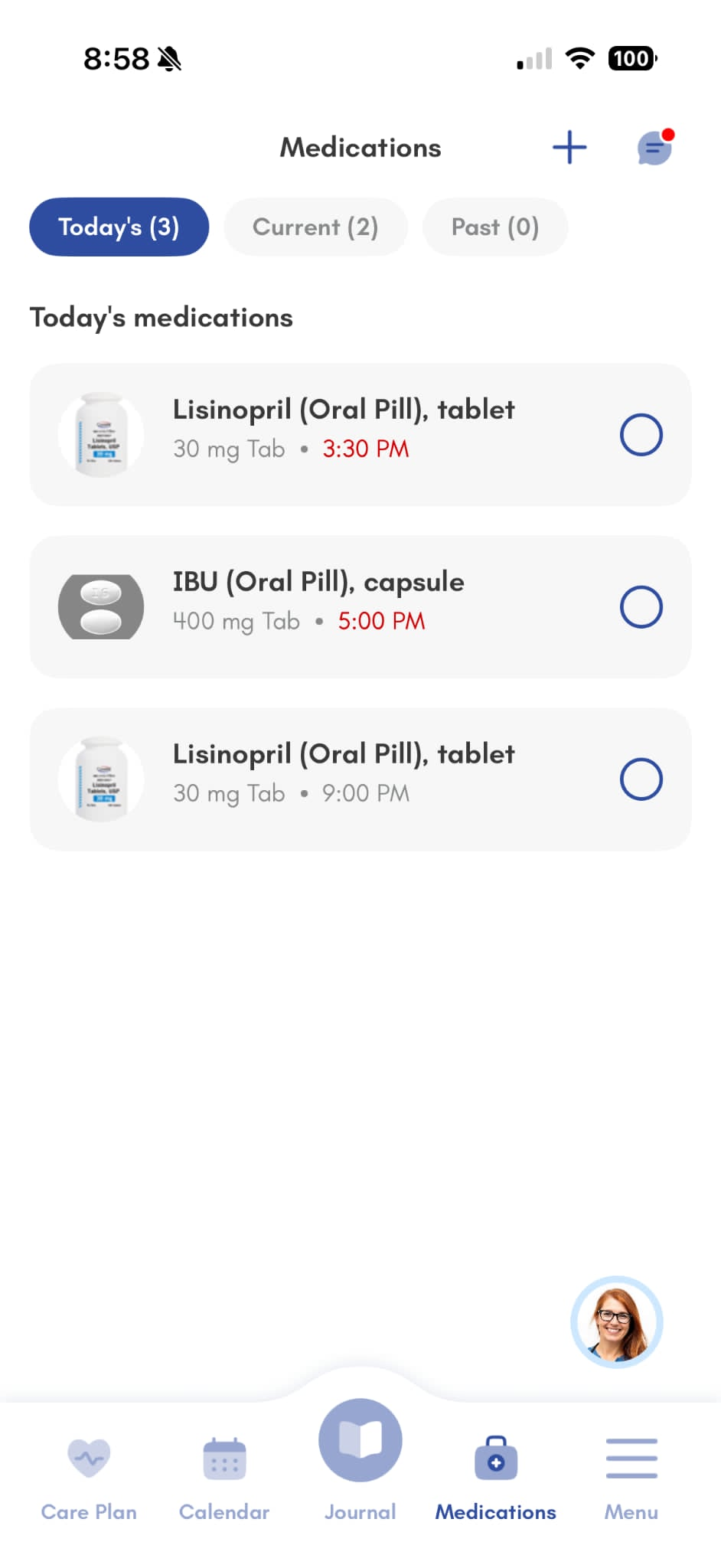
An alarm is a prompt; a person confirms the dose. Agree who checks, and follow the prescriber's instructions. The Alzheimer's Association recommends keeping current medication records.
When a Clock Stops Helping
Reassess the clock when you notice any of these signs:
- They stop looking at the clock.
- They read the words and miss the meaning.
- They hide the clock or move it away.
- Its alarms leave them upset or anxious.
Avoid quizzing them about the time; use calm spoken cues and a familiar daily order. Respond to the worry behind repeated questions.
Adapt reminders to remaining abilities and discuss changing support needs with their clinician.
Sudden new or markedly worse confusion needs immediate medical help. It can have causes that need urgent treatment, so seek help right away, whatever stage the clock trial has reached.
Keep Everyone on the Same Daily Routine
Put meals, visits and the day program on the shared Caring Village calendar, and log each day in the Wellness Journal for every helper.
- Meals and visits on one shared calendar
- Daily notes every helper can read
Nov 19Thursday

Relatives sharing care can explore apps for dementia caregivers for calendars and updates.
Dementia Clock FAQ
What Is the Best Clock for Someone With Dementia?
American Lifetime is a useful first option for a clear morning or night label. Choose a clock your loved one can see, understand and accept. Check it from their usual seat and involve them in the choice.
Do Dementia Clocks Help in Later Stages?
A clock may stop helping when words or numbers lose meaning. Adapt cues to remaining abilities and plan personal support as dementia changes over time.
How Long Do Battery-Operated Dementia Clocks Run?
Some backup batteries preserve settings only. American Lifetime needs outlet power, while Idem's battery keeps the display running for 6 to 8 hours during an outage. Check the comparison for estimated runtime and ask how brightness affects it.
Is a Digital or Analog Clock Better for Dementia?
Choose the format the person still understands. Words can explain morning or night, and a familiar analog clock may stay useful. Watch their response before replacing a clock they already read.
Is a Dementia Clock the Same as the Clock-Drawing Test?
They are different things. A day clock is a household aid; clock drawing is a task used in clinical cognitive screening such as Mini-Cog, separate from choosing a clock.
Match the Clock to What You're Seeing
Match the observed confusion to one useful feature, and notice when to change course.
| What You See | Feature and Pick | When to Change Course |
|---|---|---|
Morning or night? | Time-of-day words; American Lifetime or Day Connect | When words lose meaning, offer a spoken cue and familiar routine. |
Gets up thinking it is morning | Readable night label and dimming; American Lifetime | Persistent waking needs broader support. Read about sundowning and nighttime wandering. |
Right routine, wrong hour | Selective alarms; JALL or remotely updated Idem | If prompts upset them, reduce alarms and have a helper guide the activity. |
Misses medication prompts | Custom messages; Robin or Idem | Arrange a person to check. Compare medication reminder apps for the family's workflow. |
Family needs remote updates | Companion app; Idem | Budget for connectivity and someone local to troubleshoot. |
Text is too small | Try the reading distance first; larger American Lifetime or Robin options | Consider a spoken cue if a larger screen still leaves them unsure. |
Icons confuse, or the clock is hidden | Text-only Day Connect or a familiar-looking clock chosen together | Respect rejection; reconsider location, style or the need for a device. |
The clock has lost its meaning | Personal support and a consistent daily order | Ask the care team to reassess needs. For wandering concerns, GPS trackers address a separate safety decision. |
The Bottom Line
Choose a readable clock first, and arrange setup help for a gift recipient. Put visits and follow-up on a shared caregiver calendar, so the routine has people behind it.
Give Every Day a Shared Plan
Create a village for your loved one and share routines, medications and family updates in one place.
- Free plan with a shared calendar
- Medication records in one place
- Trusted by 85,000+ families; 4.6 stars on the App Store
It's a comfort to be able to just look in regularly just to see how Mom is and know she is fine and is being attended to daily; and without having to feel like, as when calling her, I may be disrupting her routine.
